Paste the list you plan to run
Drop in raw proxy lines or import text/CSV. The app flags malformed rows, duplicates, and anything that should be cleaned up before a task.
Free local proxy tester
Test a proxy list against the exact sites your tasks will hit. Keep the lines that pass, spot slow or blocked routes, and dig into diagnostics only when a run needs cleanup.
Built for drop prep
Simple mode keeps the first run focused on readiness, status totals, and target summaries. Advanced mode adds input hygiene, duplicate counts, request pacing, setup files, diagnostics, Exit IP review, and report exports for deeper cleanup.
Drop in raw proxy lines or import text/CSV. The app flags malformed rows, duplicates, and anything that should be cleaned up before a task.
Check Pokémon Center, Target, Walmart, Shopify, SNKRS, judge endpoints, or the exact URLs your task group will hit.
Runs go from your desktop through HTTP, HTTPS CONNECT, or SOCKS5 proxies, so latency, status, and exit IP match the route you actually use.
Use Advanced mode for request profiles, pacing, retries, local setup files, privacy audit details, diagnostics, and exit IP review.
Copy usable proxies, export filtered CSV, retest a narrowed view, or save masked JSON reports when you need a support-friendly record.
See it in action
Paste the list, add the targets, run the check, then filter down to the proxies you would actually trust in a live task.
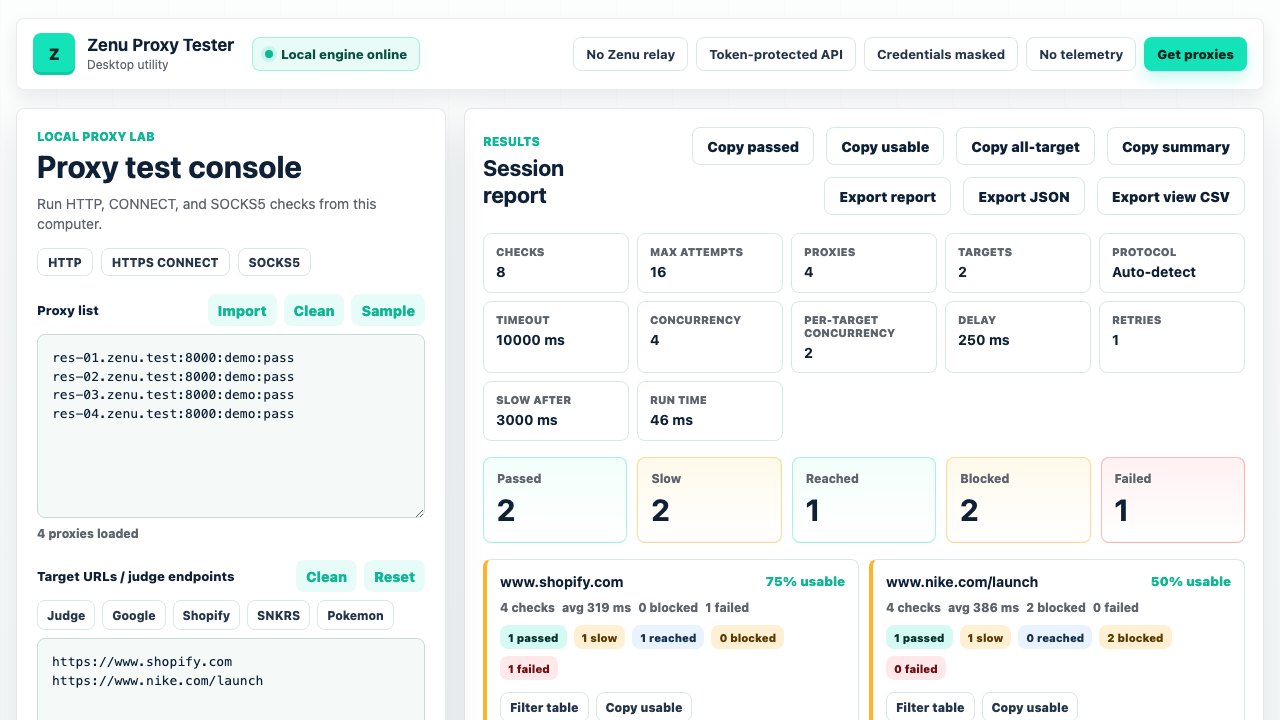
Separate Pokémon Center, Target, Walmart, Shopify, SNKRS, and custom URLs instead of trusting one blended health score.
Catch shared, mixed, or rotating egress before those sessions land in a real task group.
Copy the visible winners after filtering by target, status, latency, diagnostic note, or exit IP.
Download
Download without joining a list, or leave an email for release notes, target fixes, and important app updates. Your proxy lists, credentials, target URLs, exit IPs, and test results stay in the desktop app.
v0.1.2 · Free · macOS Apple Silicon · Windows · Linux AppImage · All releases
Need fresh lines for the run? Get Zenu residential and datacenter proxies →
FAQ
Simple mode is the quick path: paste proxies, choose targets, run the check, review readiness, copy usable proxies, and export CSV.
Use Advanced mode when you need request profiles, queue delay, retries, slow thresholds, privacy audit details, local setup files, Exit IP insights, grouped diagnostics, retests, or masked reports.
An online checker tells you how its server reaches a site. This app tests from your machine, through your proxies, to the targets you choose. Read the comparison.
It stays in the desktop app. Results use masked credentials, and this page never asks you to upload proxy lines to Zenu.
Yes. Paste HTTP, HTTPS CONNECT, or SOCKS5 lists from any provider and test them locally.
Use the same target URLs you plan to run, then export only the lines that pass or come back acceptably slow for each target.
Get started
Download the tester, check the targets that matter, and keep only the lines worth running.